

What is DevOps, and does your business need it? Here is a plain explanation of how it works and how to tell if it fits your team.

What is DevOps? It is a way of working that puts the people who write software and the people who run it on the same team, with shared tools and a lot of automation, so that updates reach users faster and break less often.
Before DevOps, those two groups were usually separate. Developers wrote the code and handed it to an operations team, who deployed it and dealt with whatever went wrong. When something broke, each side had a fair argument that the other was responsible, and releases were slow and stressful for everyone.
The word describes how a team works. People sometimes use it for a job title or a piece of software, which causes a lot of confusion. Google’s DORA research has measured how software teams deliver since 2013, and most of what is known about DevOps comes from it.
What DevOps Looks Like Day to Day
Take a developer who finishes a small change to an app. In an older setup, she sends it to the operations team and waits for a release window, which might be weeks away. In a DevOps setup, she saves the change to a shared code repository, and the rest happens automatically.
First, a set of automated tests runs against the new code. If a test fails, she hears about it within minutes and fixes the problem while the work is still fresh in her mind. If everything passes, the system builds the new version and sends it to a test environment. After a final check, it goes live. Teams call this automated path a CI/CD pipeline. CI stands for continuous integration, which means merging and testing changes often. CD stands for continuous delivery, which means any change that passes the tests can be released.
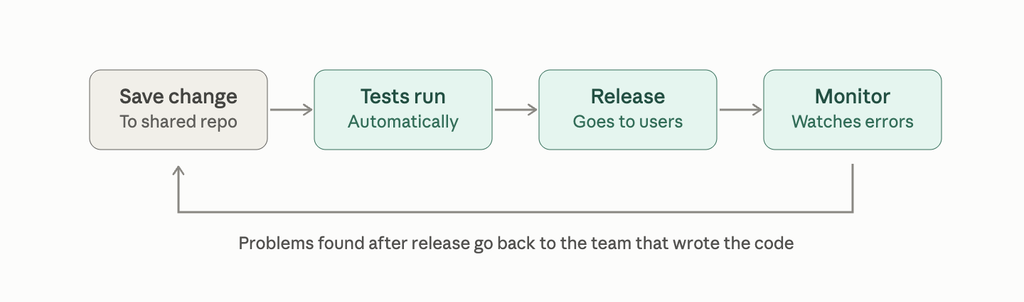
Once the update is live, monitoring tools watch how the app behaves. They track errors, slow pages, and server load. When something goes wrong, they alert the team, and the same people who wrote the code help fix it. Nobody has to work out which department owns the problem first.
Teams also treat their servers and settings the way they treat code. They write them down in files that can be reviewed, saved, and reused. Setting up a new environment then takes a few minutes, and the result matches what the team already runs. The purpose of all this is to make releases small and frequent. A small change is easier to test, and when it breaks, the cause is easier to find.
What DevOps Changes for a Business
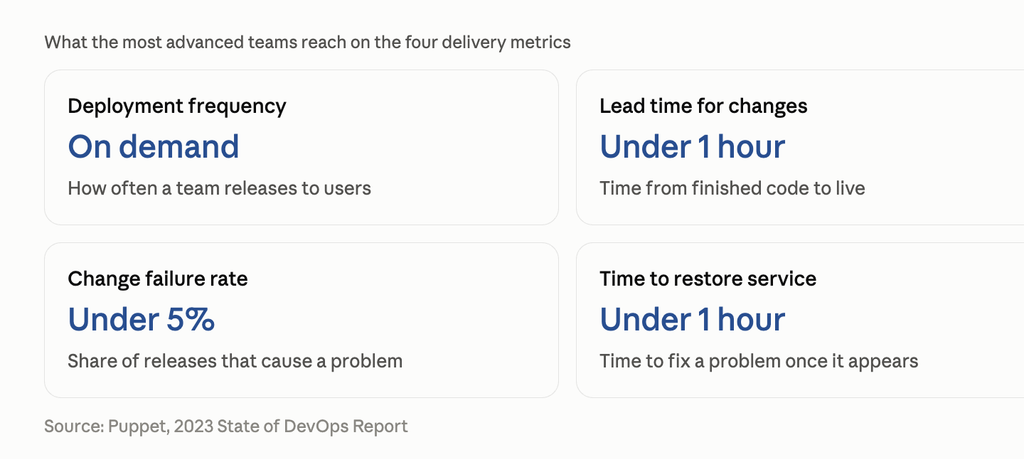
Researchers who study software teams measure delivery with four numbers. Deployment frequency is how often a team releases to users. Lead time is how long a change takes to go from finished code to live. Change failure rate is the share of releases that cause a problem. Recovery time is how long the team takes to fix a problem once it appears.
Teams with a mature DevOps setup score well on all four. Puppet’s 2023 State of DevOps report found that the most advanced teams could deploy on demand, ship a change in under an hour, and keep their failure rate under 5%. They also restored service in under an hour when something broke.
For a business, those numbers show up as things people can see. A bug gets fixed the same day. A new feature reaches customers weeks sooner. Releases stop being a stressful event that the whole company dreads.
Those figures come from teams that have worked at it for years, though. Most companies start much lower. A team that releases once a month and recovers in a day is already doing something useful, and every step toward faster, smaller releases helps.
Surveys also link DevOps to AI projects. Seventy percent of organizations in one 2026 guide agreed that DevOps maturity improves their AI results. A vendor wrote that guide, so treat the number as a rough signal. The logic is sound, since AI features still have to be tested, released, and monitored like any other software.
Does Your Business Need DevOps?
It depends on how often your software changes and how much trouble releases cause you.
A few signs that point toward DevOps. Releases take days or weeks of preparation. Updates break things that worked before. Only one person knows how to deploy, and everyone waits when that person is away. Fixes for small bugs sit in a queue for a month. According to one vendor guide, frequent production failures and a slow development cycle are the usual signals that a team needs better automation and testing. Startups feel this early because they have to ship quickly to keep up with competitors.
Other businesses can wait. If you buy most of your software and a vendor looks after the updates, you have little to deploy yourself. The same goes for a small internal tool that changes twice a year. A full DevOps setup would cost more than it saves in those cases.
Even then, a few basics are worth having. Keep the code in version control. Run automated tests before each release. Write the deployment steps down, or better, turn them into a script. A small team can set these up in a few weeks, and they cover most of what the larger setups do.
The tools are the easy part. The harder part is getting developers and operations people to share responsibility for the same outcome. Hiring one DevOps engineer and leaving the rest of the process alone usually leads to a new bottleneck, since everything now waits on that one person.
A sensible first step is to pick the most painful part of your release process and automate it. For many teams that is the testing, and for others it is the deployment itself. Once that works, move on to the next one.
Getting Started
Most teams begin with a continuous integration tool that runs their tests every time someone saves a change. GitHub Actions, GitLab CI, and Jenkins are common choices, and the first two are built into platforms many teams already use. Setting up a basic pipeline for one application usually takes a few days, and it gives you the clearest picture of what to automate next.
Measure from the first week. Write down how often you release, how long a change takes to go live, how many releases cause problems, and how long you take to fix them. Without a starting point it is hard to tell whether anything has improved. Google’s DORA team has also warned against using these numbers to rank or reward individual developers, since people start gaming a number once it becomes a target. They work better as a way for the team to see how it is doing.
Expect the setup to change as the company grows. DevOps asks developers to look after their own infrastructure, and that works well for a small team. With dozens of developers, many of them end up spending a large share of their week on pipelines, cloud settings, and security rules instead of the product. Larger companies often respond by building an internal platform that handles those tasks for everyone, which is called platform engineering. We cover how that works in our blog on platform engineering, and it is worth reading once your team passes ten or fifteen developers.
If you are still asking what DevOps is for your own company, the answer will usually come from one repeated frustration, such as slow releases, broken updates, or a deployment only one person understands. Choose that problem, fix it with automation, and see what the next one is.
Enjoyed this article?
Let’s talk about how a focused outsourcing partner can move your roadmap forward.