
Custom software vs off-the-shelf: a plain guide to what each costs over time, when to buy, when to build, and when a mix of both makes sense.

Most people compare custom software vs off-the-shelf software by price first. A subscription looks cheap next to a build that costs far more upfront, so buying feels safe. Subscriptions add up, though. Zylo’s 2025 SaaS Management Index found that the average company spends about $4,830 per employee on SaaS every year, and about $21 million a year goes to licenses nobody uses. Some teams have started building their own tools instead. In a Retool survey of 817 of its own users, 35% of teams said they had replaced at least one SaaS tool with a custom build. This guide covers when to buy, when to build, and when a mix of both works best.
What Off-the-Shelf Software Does Well
Off-the-shelf software is a product a vendor builds once and sells to many customers. You sign up, set it up for your team, and pay a subscription. Accounting tools and CRMs usually work this way.
You Can Start This Week
Most tools take days to set up, not months. A sales team that needs a CRM can be running by Friday, while a custom build would still be in planning. The upfront cost is also low, since you pay a monthly fee and not a project bill.
The Vendor Handles the Upkeep
The vendor fixes bugs, patches security holes, and ships updates, so your team does not need a developer on call. Thousands of other customers have already used the product, which means most of the obvious problems are gone by the time you sign up. New hires often know the tool already.
The catch is that you adapt your work to the software. If your process differs from what the vendor had in mind, you either bend your process or pay for workarounds.
What Custom Software Does Well
Custom software is built for one company, around the way that company works. You describe the process, a development team builds it, and you usually own the result.
It Fits Your Process
With a bought tool, your team bends its work to match the software. With custom software, the software follows your process. If your team approves orders in a way no vendor supports, the build can follow that exact path, so people spend less time on workarounds like exporting data to a spreadsheet. You also decide what gets built next, and no vendor can retire the product or change the pricing on you.
It Can Become an Advantage
Your competitors can buy the same CRM you use, but they cannot buy your software. That matters most when the process is what customers pay for, such as a pricing engine or a booking flow nobody else offers.
The downside is time and risk. A build usually takes months before anyone can use it, and you only learn whether you built the right thing once real people use it.
Custom Software vs Off-the-Shelf: What Each Costs Over Time
Off-the-shelf software costs little at the start and keeps charging you as long as you use it. Custom software costs a lot at the start and less afterward.
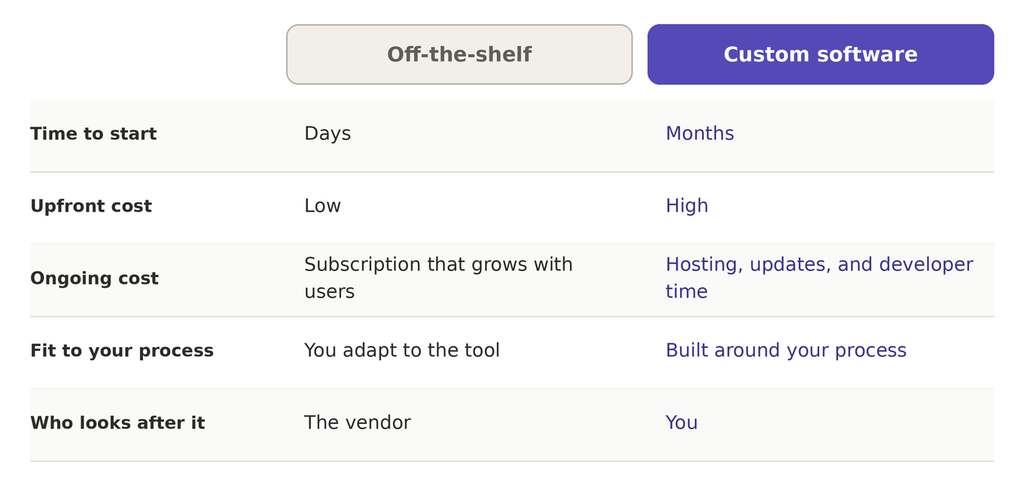
Most bought tools charge per user each month, so the bill grows when your team grows. Vendors can also raise prices once your team depends on the product, and setup, migration, and training add to the total. The time your team loses to workarounds counts too, such as a weekly spreadsheet export because the tool cannot do one step.
With custom software, the big cost is the build, which you pay before anyone uses the product. After launch, you still pay for hosting, security updates, and developer time. If one developer knows the whole system and leaves, the next one has to learn it from scratch.
Where the lines cross depends on your team size, how long you keep the software, and how well the build goes. A small team may never reach that point, while a large team paying per seat can reach it much sooner.
How to Choose Between Custom Software vs Off-the-Shelf
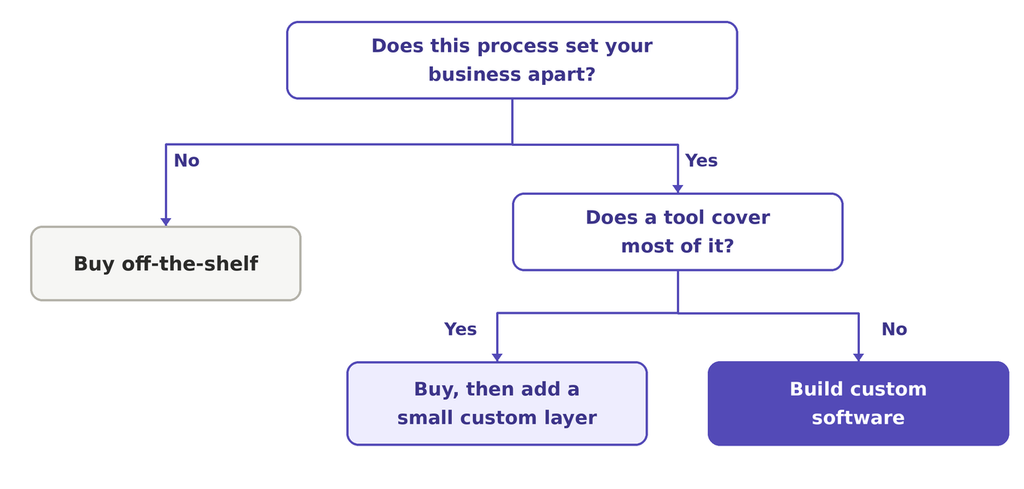
Start with one question: does this process set your business apart? The flow below shows where each answer leads.
Buy When the Process Is Common
Customers do not choose a company by how it runs payroll or bookkeeping. If a tool already does most of what you need, buy it and spend your effort elsewhere.
Build When the Process Is Your Edge
If the process is what customers pay for and no tool matches it, build. The same goes for a team that has outgrown its workarounds and loses more time each month than a build would cost.
Mix the Two When You Are Unsure
Many teams buy a tool first and add a small custom layer around it, such as an integration or a dashboard. That keeps the fast start and lets you build only the one piece that matters. You also learn what the tool is missing before you spend on a full build.
Enjoyed this article?
Let’s talk about how a focused outsourcing partner can move your roadmap forward.