
Chrome Extensions for Web Developers You Need to Know
A focused list of Chrome extensions for web developers to improve workflow, test smarter, and handle everyday dev tasks faster
For programmers looking to increase productivity and deliver high-quality work in less time, these are 10 Chrome extensions for web developers that are worth installing:
- Lighthouse
- JSONView
- Awesome Screenshot & Screen Recorder
- EditThisCookie
- Test IE
- Lorem Ipsum Generator
- Octotree
- WindowResizer
- Accessibility Insights for Web
- Vimium
About Chrome DevTools
Before we get into the list, it’s important to talk about Chrome DevTools.
DevTools isn’t a plugin or an extension—it’s built into Chrome. It gives you everything from performance monitoring to debugging tools to a powerful JavaScript console.
Whenever you’re looking for new functionality, always check DevTools first. Many features developers look for in Chrome extensions for web developers already exist in DevTools in some form. If the built-in tool works well enough, use it. But if the experience is clunky or the feature set too limited, that’s when extensions come in handy.
Some extensions below overlap with what DevTools offers, but they still add value—either by simplifying the process or extending the functionality in useful ways.
1. Lighthouse: A Core Chrome Extension for Web Developers
Lighthouse is an open-source auditing tool that runs performance and best-practices checks on websites. It provides insights on:
- Load time
- SEO performance
- Accessibility metrics
- Opportunities to improve speed
- Cumulative layout shift (jitter)
Use Lighthouse from day one to track how your site performs on mobile and desktop. Running regular audits helps catch performance issues early—before they affect users or become costly to fix.
2. JSONView
Source: Jsonview, Benhollis, available at: https://jsonview.com/(accessed 25 March 2025)
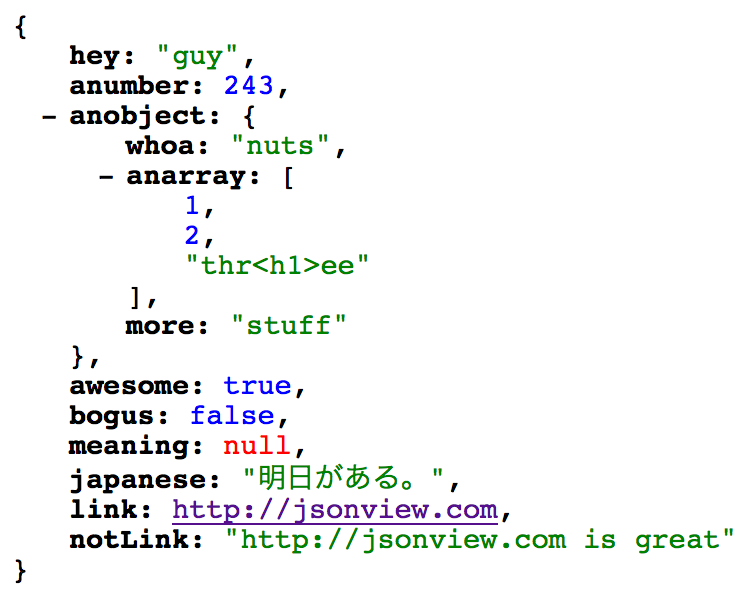
JSON is everywhere in modern web development. Unfortunately, browsers don’t format it well by default.
That’s where JSONView comes in. It beautifies your JSON data and adds useful features:
- Collapse and expand object trees
- Color-coded keys, values, and links
- Highlights errors
- Option to view raw data when needed
If you work with APIs or inspect a lot of JSON responses, this tool makes your life much easier.
3. Awesome Screenshot & Screen Recorder
Most tools with “awesome” in the name fall short—but not this one. It’s great for both capturing screenshots and recording screen activity.
Use it to:
- Record bugs as they happen
- Show steps leading to a crash or UI glitch
- Create quick product demos or walkthroughs
Just start recording, reproduce the issue, and attach the video (MP4) to your bug report or JIRA ticket. It’s much faster than writing everything out, and your teammates will appreciate the clarity.
4. EditThisCookie: Manage Browser State with This Chrome Extension for Web Developers
Cookies are key to how most modern apps handle sessions, preferences, and state. With EditThisCookie, developers can:
- View and edit existing cookies
- Delete or block cookies
- Import/export cookies as JSON
- Modify expiration dates
This is especially useful when testing logins or simulating different user states—without having to repeat manual steps like logging in and out.
5. Test IE: Legacy Browser Testing via Chrome Extensions for Web Developers
Even though IE is mostly phased out, some apps still need backward compatibility testing. The Test IE extension helps you simulate Internet Explorer versions 6–11 and different versions of Microsoft Edge—all from Chrome.
A few caveats:
- You need to sign in to use it
- It works through the BrowserStack service
It’s less of a standalone plugin and more of a launcher to a cloud testing environment. Still, if you need to test in legacy Microsoft browsers, this is one of the easiest ways to do it.
6. Lorem Ipsum Generator
Sometimes you just need placeholder text—fast. This extension gives you exactly that. No need to search for a Lorem Ipsum generator or copy/paste from old files.
It’s especially handy for:
- Prototyping designs
- Mocking up UI layouts
- Filling out text blocks during early dev stages
It doesn’t do anything fancy, but it does its job perfectly.
7. Octotree: GitHub Navigation Chrome Extension for Web Developers
Sourch: Octotree – GitHub code tree, Chrome, available at: https://chromewebstore.google.com/detail/octotree-github-code-tree/bkhaagjahfmjljalopjnoealnfndnagc?pli=1 (accessed 25 March 2025)
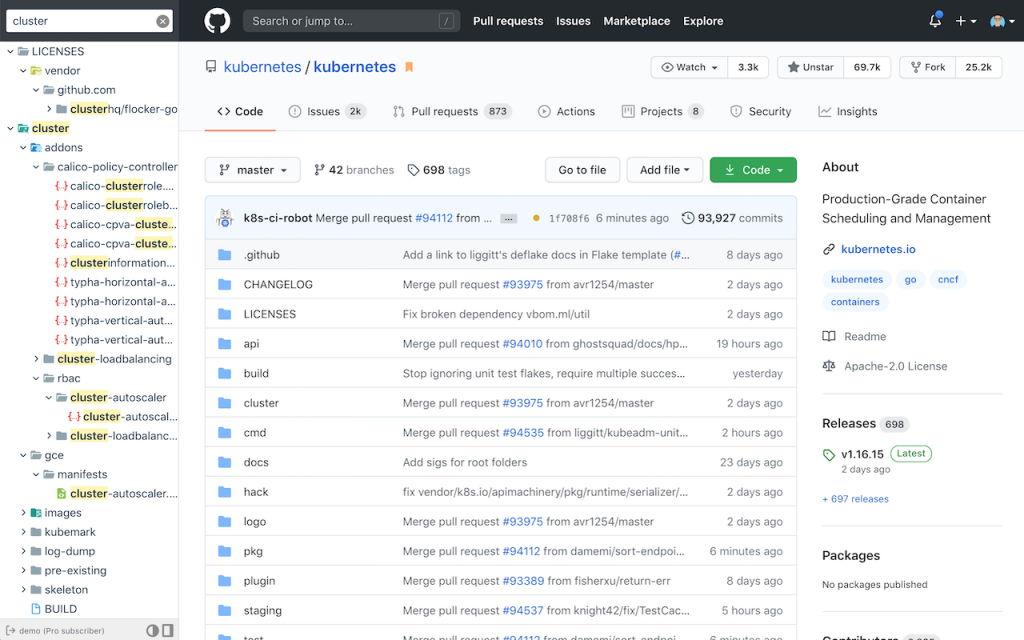
Navigating GitHub repos through the browser can be painful, especially in large codebases. Octotree makes it easier by adding a collapsible file tree in the sidebar—similar to what you’d see in VS Code or Explorer.
It supports:
- Quick file access
- Search within the repo
- Bookmarking frequently used files
If you work with GitHub often, Octotree streamlines your workflow significantly and is one of the most practical Chrome extensions for web developers doing version control in the browser.
8. WindowResizer: Responsive Design Testing Chrome Extension for Web Developers
DevTools lets you simulate different screen sizes, but opening DevTools just to resize the window is overkill. WindowResizer is faster and more intuitive.
You can:
- Set custom screen dimensions
- Switch between devices
- Toggle orientation from portrait to landscape
It’s great for testing responsive designs without all the extra clicks.
9. Accessibility Insights for Web
Accessibility is about more than alt tags. If you want your site to be usable by everyone, you need to think about:
- Font sizes
- Color contrast ratios
- Keyboard navigation
- Screen reader compatibility
Accessibility Insights scans your site and points out where it falls short. It flags issues that might make your site difficult for users with visual, auditory, or motor impairments.
It’s one of the most valuable Chrome extensions for web developers who care about inclusive design and meeting compliance standards.
10. Vimium: Keyboard Power Chrome Extension for Web Developers
If you’re a fan of Vim, this one’s for you. Vimium brings keyboard-centric browsing to Chrome. You can:
- Navigate back/forward
- Switch tabs
- Open links
- Scroll pages
- Trigger commands—all without touching the mouse
For developers who live on the keyboard, Vimium makes browsing faster and more efficient. Among Chrome extensions for web developers focused on speed and control, this is a standout.
Verwandte Artikel

Feb 03, 2026
Read more
How Claude Code Is Changing How Anthropic Builds Software
Claude Code is Anthropic’s AI coding tool, transforming how engineers work and shaping the future of AI-powered software development.

Jan 27, 2026
Read more
Why So Many See an AI Bubble Emerging
Is the AI bubble real or just hype? A clear look at why AI feels overheated, how tech bubbles form, and what history suggests comes next.

Jan 20, 2026
Read more
The Problem With AI Image Safeguards
The technical limits of AI image safeguards are becoming clear as image tools spread, revealing why abuse and misuse are so hard to stop.

Jan 13, 2026
Read more
How to Choose the Right AI Tool in 2026 (Without Wasting Money)
Not sure how to choose the right AI tool in 2026? This guide helps you avoid hype, save money, and pick tools that actually fit how you work.

Jan 06, 2026
Read more
Best AI Tools for 2026: What’s Actually Worth Using
The best AI tools for 2026 aren’t the most hyped ones. This guide cuts through the noise to highlight AI tools that actually earn their place.

Dec 30, 2025
Read more
Best Microlearning Apps for 2026: Learn New Skills in Minutes
Best microlearning apps to grow your skills quickly, fit lessons into your day, and make learning simple and effective.